KSV Data Saver · Windows · v1.3.3
Every client document from WhatsApp, filed before you ask for it.
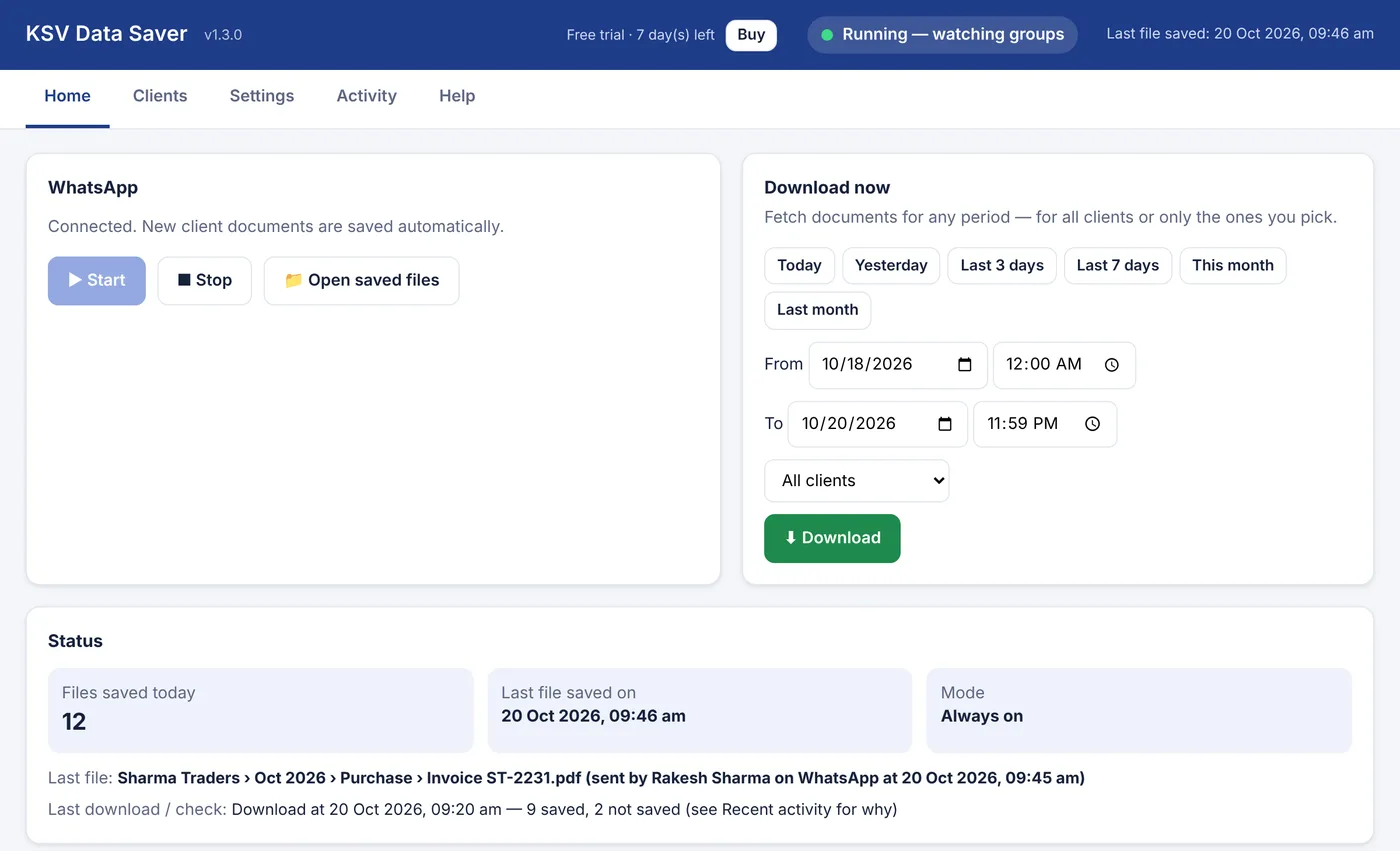
Clients send invoices, bank statements and ledgers in WhatsApp groups. KSV Data Saver saves each file into the right client, month and type folder on your PC, within seconds, without anyone forwarding or downloading.
7 days free · Windows 10/11 64-bit · about 12 MB
What lands on your D: drive
What it does
Built around how a tax office actually works
| Sorts by document type | Sale, Purchase, Expenses, Bank Statement, Vendor Ledger and Other, inside a folder for each client and month. |
|---|---|
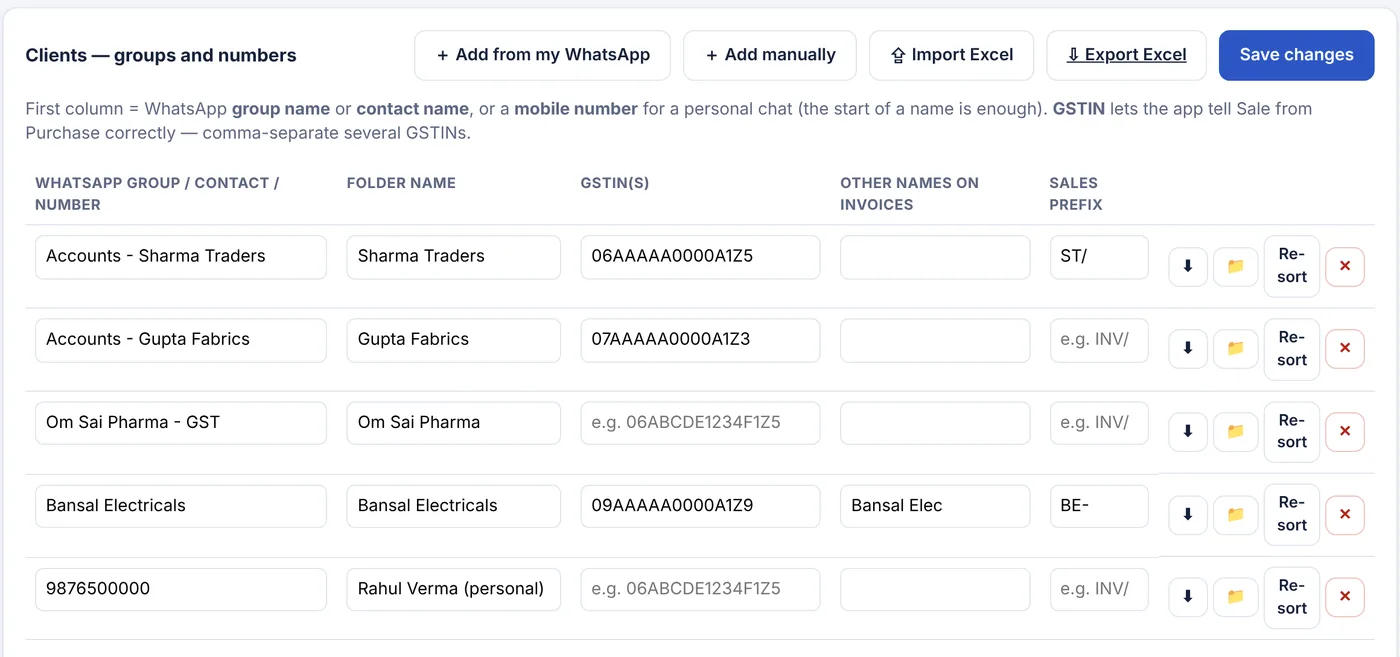
| Knows sale from purchase | Reads GSTINs, Bill To / Ship To, the signing party and your client's invoice series. Professional-service bills (SAC 99) go to Expenses. |
| Your chats, your choice | Pick client groups and personal numbers, add every group with a word like "accounts", or save the complete WhatsApp. |
| Skips your own office | Files sent by your office numbers and staff are not saved unless you switch them on. |
| Download any period | Today, last 7 days, this month or exact dates and times, for all clients or only the ones you pick. |
| Runs when you want | Always on, at set times, or only when you click. Stays linked to WhatsApp and reconnects by itself. |
| Explains every file | An index for each client lists the date, sender and file, and why it went to that folder. The activity log says why any file was skipped. |
| No duplicates | The same file sent twice, or in two groups, is saved once. |
| Updates itself | New versions install automatically after a digital-signature check. |
Set up in ten minutes
Install, add clients, scan once
- InstallRun the setup file. On the blue Windows screen click More info, then Run anyway.
- Add clientsTick your client groups from WhatsApp or import the Excel template, then add each GSTIN.
- Link WhatsAppClick Start and scan the QR code from your phone's Linked devices.
Price
One licence per office
Yearly licence
Price on WhatsApp
plus GST · billed by KSV Accounting & Taxation Consultants
- All features
- All updates during the year
- WhatsApp support
Free trial
7 days
no card, no sign-up
- Every feature open
- Saved files stay yours after the trial
- Buy from inside the tool
Questions
Before you install
Does it read my personal chats?
It saves files only from the chats you choose: your client groups, chosen personal numbers, or, if you switch it on, every chat. Messages are not copied; only the documents and photos you selected are saved.
Is anything uploaded to KSV or the internet?
No. Files go straight from WhatsApp to the folder on your PC. KSV never receives your documents or your client list. The tool only contacts KSV to check for updates.
Do I need to keep WhatsApp open on the PC?
No. The tool links to your WhatsApp the same way WhatsApp Web does: scan a QR code once. Your phone keeps working normally.
Why did WhatsApp ask me to scan again?
One WhatsApp number can have only four linked devices. Linking a fifth removes the oldest. Remove devices you no longer use from WhatsApp → Linked devices, then scan once.
How does it tell a sale from a purchase?
It reads the document text: GSTINs, Bill To and Ship To blocks, who signed the invoice, and your client's own invoice series. Add each client's GSTIN for the best result. Photos and scanned papers go to the client's Other folder.
Will files from my own staff be saved too?
Only if you want. Enter your office numbers and staff names in Settings, and their files are skipped. One tick turns them back on.
Which computers does it run on?
Windows 10 or 11 (64-bit) with Google Chrome or Microsoft Edge installed. It is best on an office PC that stays on during working hours.
What happens when the licence ends?
Saving pauses until you renew. Everything already saved stays in your folder.